~10 min
Manual entry time~10 sec
Automated entry time< 0.1%
Error rate
Use case
Use Case
Process invoices in real time with near-zero mistakes.
Business problem
- Manual invoice entry slows finance teams.
- Errors create rework and month-end stress.
Automation objective
- Extract key fields with AI-driven OCR.
- Validate vendors before sync.
- Push clean data into accounting systems.
Business impact
- Entry time drops from ~10 minutes to ~10 seconds.
- Error rate falls from 3-5% to < 0.1%.
- Month-end stress moves from high to eliminated.
How it
works
How It Works
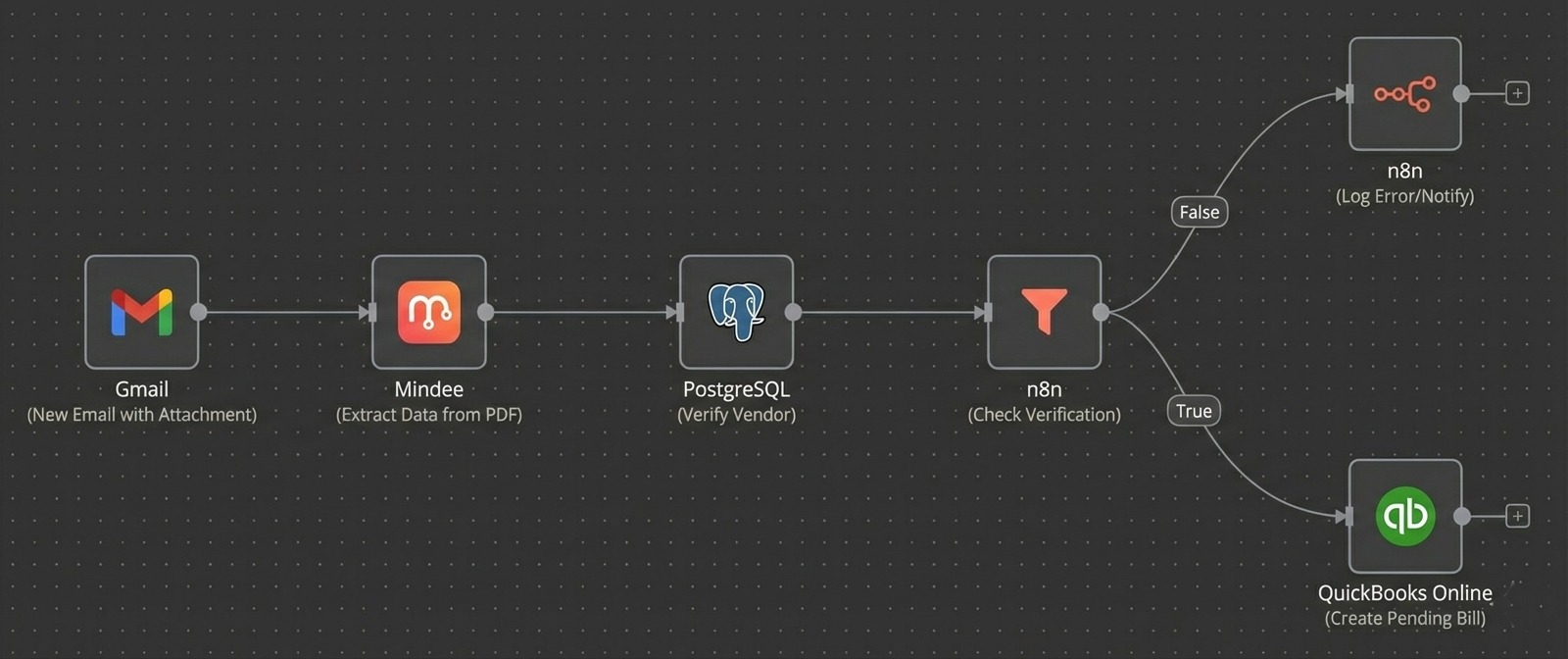
The workflow follows a repeatable trigger, AI logic, and delivery sequence.
Stage 1: Intake
- Trigger when a PDF hits the finance inbox.
- Capture vendor and invoice metadata.
- Route to the OCR workflow.
Stage 2: AI extraction
- Extract key fields with AI OCR.
- Validate vendor data against records.
- Flag exceptions for human review.
Stage 3: Accounting sync
- Push pending bills to QuickBooks Online.
- Store line items in PostgreSQL.
- Notify finance for approval queues.
Results
Results
Key metrics shift immediately after automation goes live.
Before automation
- Entry time: ~10 minutes.
- Error rate: 3-5%.
- Month-end stress: High.
After automation
- Entry time: ~10 seconds.
- Error rate: < 0.1%.
- Month-end stress: Eliminated.
Operational shift
- Finance focuses on cash flow, not cleanup.
- Vendors get paid faster with fewer errors.
- Close cycles shorten consistently.
Book a call
Environmental proof: finance teams focus on cash flow instead of
cleanup.
Implementation
Implementation
Use these indicators to see if the workflow matches your team.
Best for
- Finance-heavy orgs and multi-vendor businesses.
- Agencies managing recurring invoices.
Not ideal for
- Very low invoice volumes.
Apps used
- Gmail
- Mindee
- QuickBooks Online, PostgreSQL
Free 30 min call
Next openings this week
Book a call