1-2 hrs
Manual triage timeReal-time
Automated triageImproving
CSAT
Use case
Use Case
Escalate critical tickets instantly and assist agents with AI-powered drafts.
Business problem
- Urgent customers wait while low-priority tickets clog queues.
- Support teams are overwhelmed during spikes.
Automation objective
- Detect urgency and sentiment in real time.
- Escalate VIP and critical tickets instantly.
- Assist agents with AI response drafts.
Business impact
- Triage time drops from 1-2 hours to real-time.
- CSAT moves from declining to improving.
- Agent load shifts from overwhelmed to assisted.
How it
works
How It Works
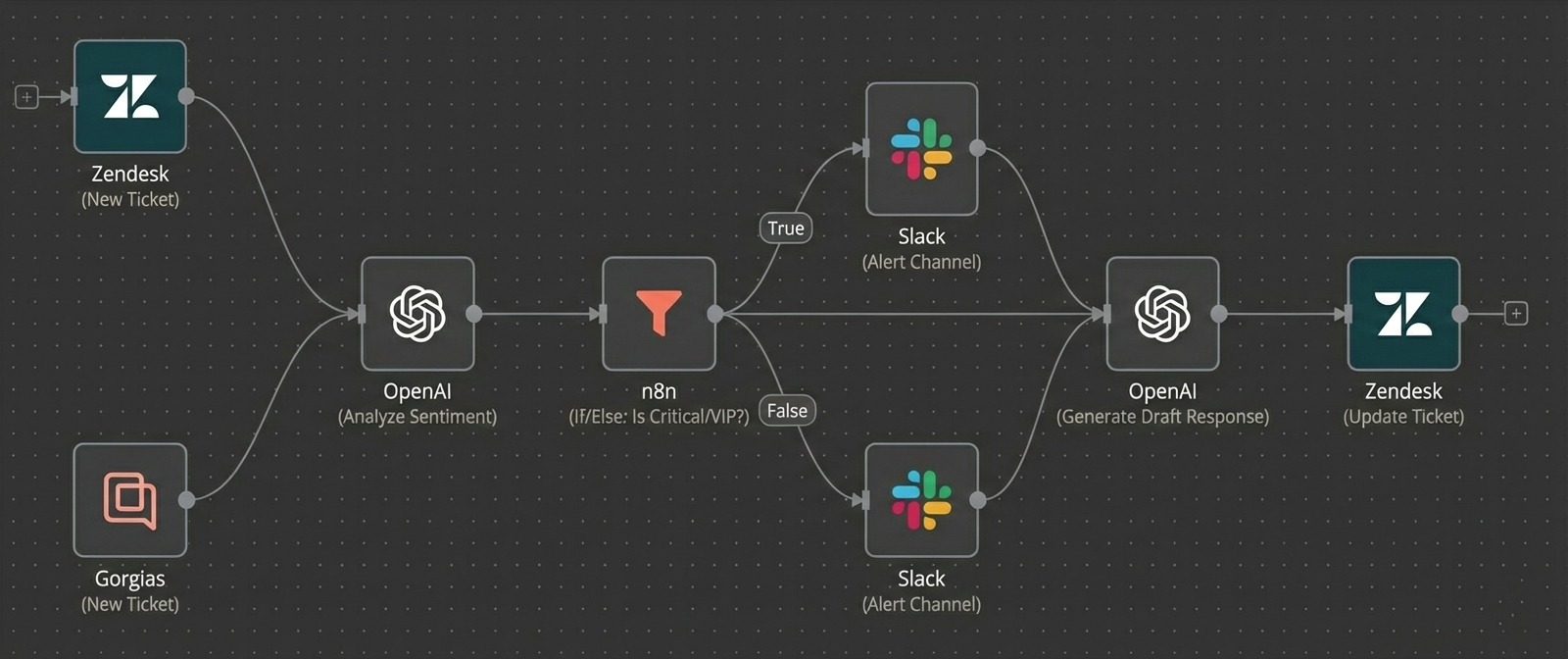
The workflow follows a repeatable trigger, AI logic, and delivery sequence.
Stage 1: Ticket intake
- Trigger on Zendesk or Gorgias ticket creation.
- Pull customer tier and history.
- Send data into sentiment analysis.
Stage 2: Sentiment + priority
- Analyze ticket sentiment with AI.
- Identify VIP and critical tickets.
- Tag and route based on urgency.
Stage 3: Escalation + drafting
- Escalate urgent tickets instantly.
- Draft response suggestions for agents.
- Notify support leads in Slack.
Results
Results
Key metrics shift immediately after automation goes live.
Before automation
- Triage time: 1-2 hours.
- CSAT: Declining.
- Agent load: Overwhelmed.
After automation
- Triage time: Real-time.
- CSAT: Improving.
- Agent load: Assisted.
Operational shift
- Critical issues surface before escalation.
- VIP customers get faster responses.
- Support teams stay calm under load.
Book a call
Environmental proof: agents handle angry customers calmly
because issues surface early.
Implementation
Implementation
Use these indicators to see if the workflow matches your team.
Best for
- SaaS support teams and subscription businesses.
- Organizations with VIP-heavy queues.
Not ideal for
- Very low ticket volumes.
Apps used
- Zendesk
- OpenAI
- HelpScout, Slack
Free 30 min call
Next openings this week
Book a call