3-5 hrs
Manual admin time0 hrs
Automated admin timeImmediate
Day-1 access
Use case
Use Case
Deliver Day-1 readiness with zero IT bottlenecks and role-based security.
Business problem
- Manual onboarding wastes hours and introduces security risk.
- Access approvals delay Day-1 productivity.
Automation objective
- Provision accounts and permissions instantly.
- Apply role-based security logic from the start.
- Generate a welcome kit without manual effort.
Business impact
- Admin time drops from 3-5 hours to 0.
- Security risk moves from high to near zero.
- Day-1 access becomes immediate.
How it
works
How It Works
The workflow follows a repeatable trigger, AI logic, and delivery sequence.
Stage 1: Trigger + intake
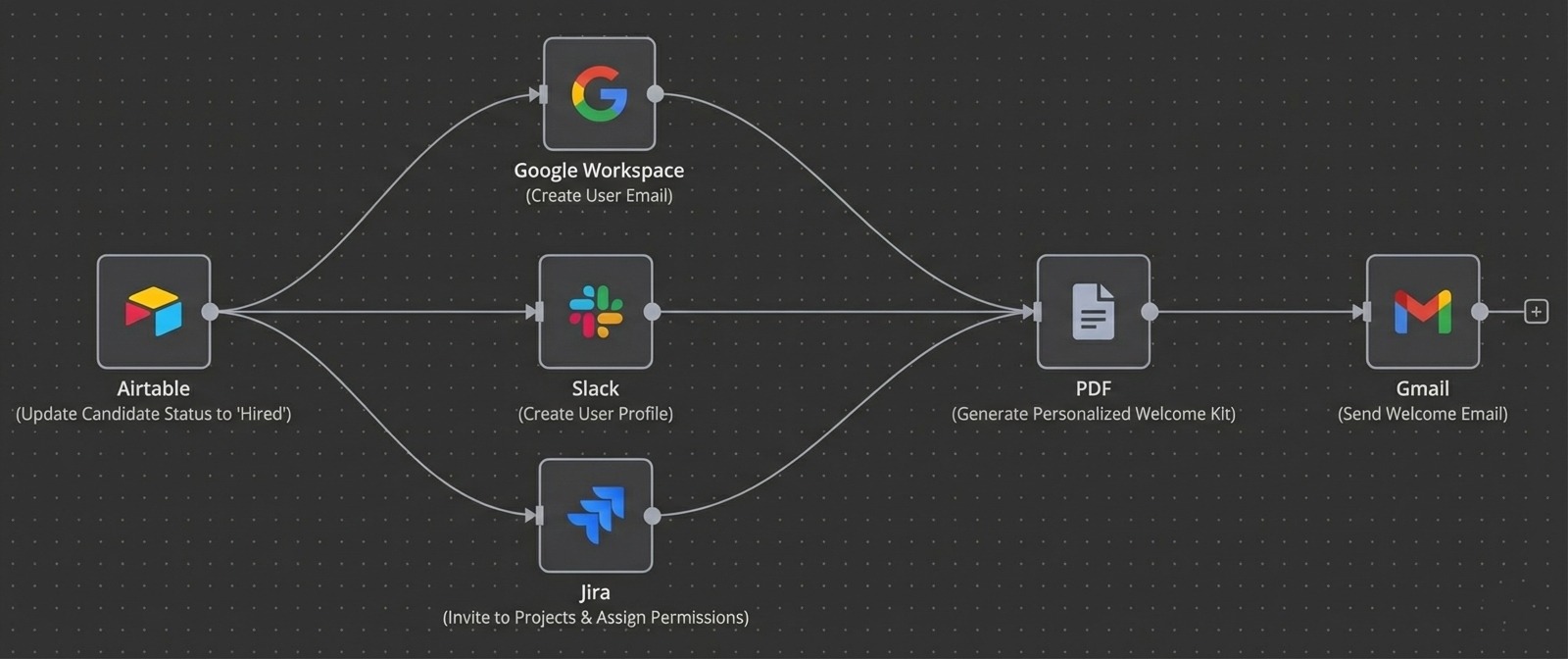
- Trigger when a candidate is marked hired.
- Pull role, team, and location from HR data.
- Route to the correct provisioning flow.
Stage 2: Provisioning
- Create Google Workspace, Slack, and Jira accounts.
- Apply role-based access permissions.
- Log provisioning steps for audit trails.
Stage 3: Day-1 enablement
- Generate a welcome kit PDF automatically.
- Notify managers and IT via Slack or email.
- Confirm completion before Day 1.
Results
Results
Key metrics shift immediately after automation goes live.
Before automation
- Admin time: 3-5 hours per hire.
- Security risk: High.
- Day-1 access: Delayed.
After automation
- Admin time: 0 hours per hire.
- Security risk: Near zero.
- Day-1 access: Immediate.
Operational shift
- New hires start productive from day one.
- IT bandwidth shifts to higher-value work.
- Compliance is built into onboarding.
Book a call
Environmental proof: new hires feel productive on Day 1 instead
of waiting for access.
Implementation
Implementation
Use these indicators to see if the workflow matches your team.
Best for
- Remote teams and fast-growing startups.
- Distributed organizations.
Not ideal for
- Very small teams onboarding once or twice a year.
Apps used
- Airtable
- Google Workspace
- Slack, Jira, Zoom
Free 30 min call
Next openings this week
Book a call